
Blog
Selenium Find Element using By ID Attribute

Selenium Find Element using By ID Attribute
In this tutorial, we will learn to inspect and find element on a web page using the ID Attribute. We will test the TestLink Login page in this example. TestLink is an open-source Testcase Management application.
Environment and Tools
The environment and the tools used in this example:
- JDK
- Maven build tool
- Selenium Webdriver
- Eclipse IDE
- Firefox Web browser Tools
- Windows 10
Inspect Web Elements
To inspect elements using Firefox Web Developer Tools, follow this link:
Sample Test Example
In this example test we will identify the elements using the ID attribute. Launch the Web developer tools to inspect the elements in the login form.
For example the login name text box element using the id: tl_login
By.id(“tl_login”)
The HTML markup code for the element is:
<input maxlength=”100″ name=”tl_login” id=”tl_login” type=”text” class=”form__input” placeholder=”Login Name” required=””>
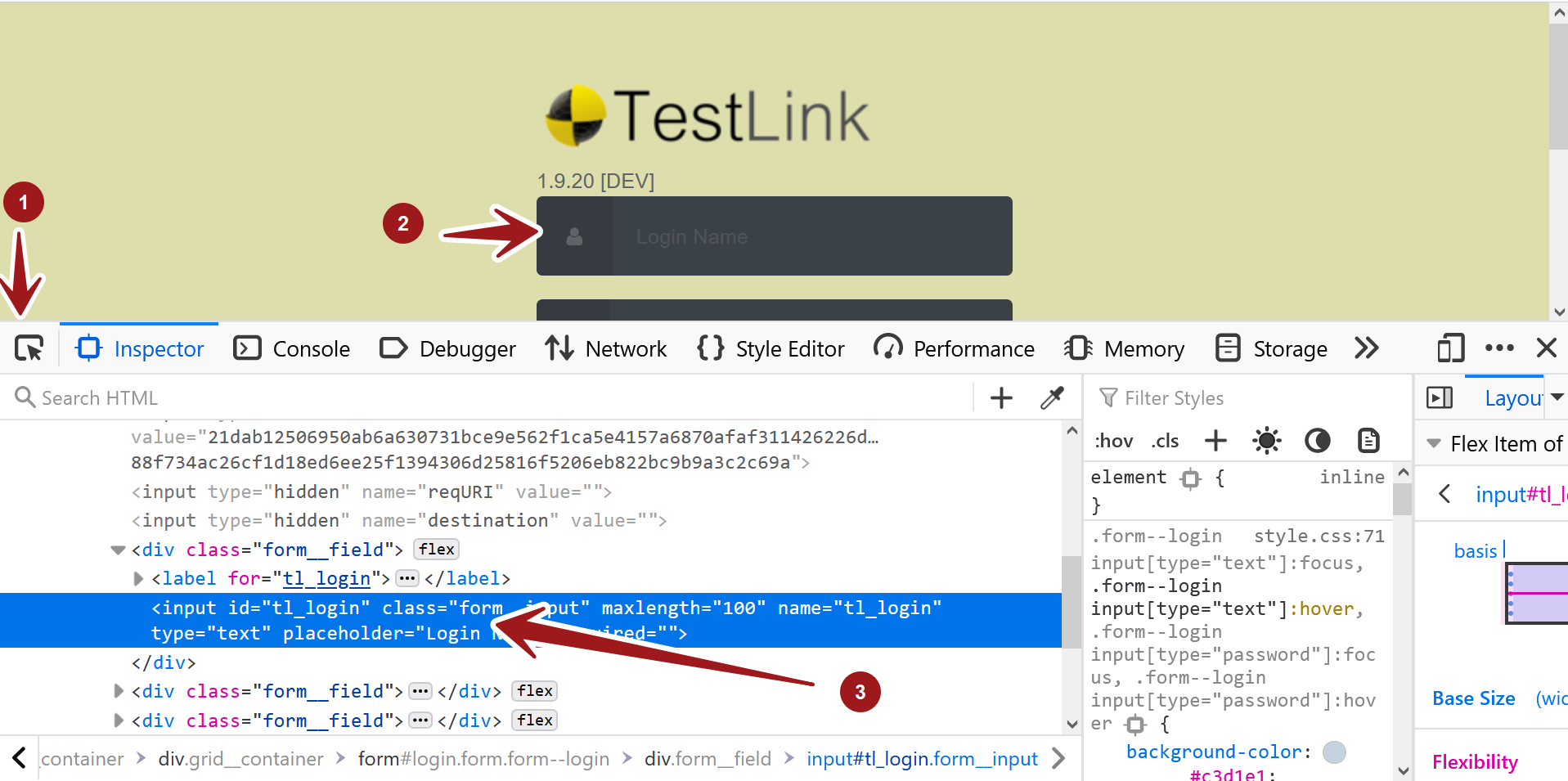
Similarly repeat the process for the password textbox and Log in button.
The HTML code for the password text box is:
<input name=”tl_password” id=”tl_password” type=”password” class=”form__input” placeholder=”Password” required=””>
The id of the element is: tl_password
To identify the element we can use he following code:
driver.findElement(By.id(“tl_password”)) .sendKeys(“admin”);
Code Listing
package com.testingdocs.tests;


import org.openqa.selenium.WebDriver;
import org.openqa.selenium.WebElement;
import org.openqa.selenium.remote.DesiredCapabilities;
import org.openqa.selenium.remote.RemoteWebDriver;
import org.testng.annotations.AfterClass;
import org.testng.annotations.BeforeClass;
import org.testng.annotations.Test;
import org.openqa.selenium.By;
import java.net.MalformedURLException;
import java.net.URL;
import java.util.concurrent.TimeUnit;

// Selenium Tutorials - www.TestingDocs.com

public class FindByIDExampleTest {
	public WebDriver driver;


	@BeforeClass
	public void setUp() throws MalformedURLException {
		DesiredCapabilities dCaps = new DesiredCapabilities();
		dCaps.setBrowserName("chrome");
		driver = new RemoteWebDriver(new
URL("http://localhost:4444/wd/hub"), dCaps);
	}

	@Test
	public void testIDLocator() throws InterruptedException {
		driver.navigate()
.to("http://localhost/testlink/login.php");
		driver.manage().window().maximize();
		try {
			driver.findElement(By.id("tl_login"))
.sendKeys("admin");
			driver.findElement(By.id("tl_password"))
.sendKeys("admin");
			driver.findElement(By.id("tl_login_button"))
.click();
			driver.manage().timeouts()
.implicitlyWait(60, TimeUnit.SECONDS);
			System.out.println("By.id demo Login
with default credentials...");

		} catch (Exception e) {
			System.out.println(e.getMessage());
		}
	}

	@AfterClass
	public void tearDown() {
		if (driver != null) {
			driver.quit();
		}
	}
}
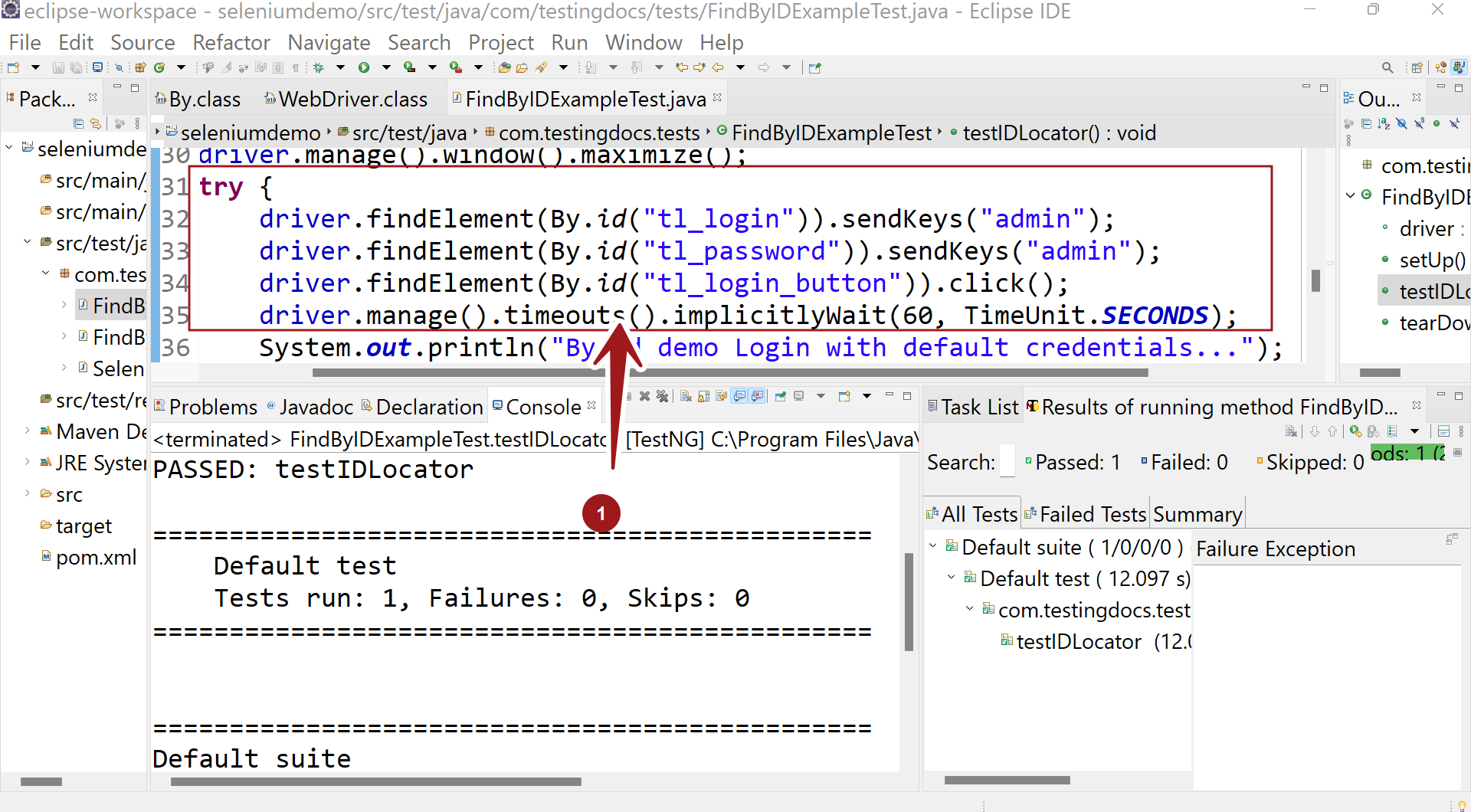
Run the test with TestNG framework. Right click >> Run as >> TestNG Test
Note that we are just identifying elements and performing some actions on them. We are not testing any expected output in the test.