
Blog
Create Java Package in Eclipse

Create Java Package in Eclipse
This article demonstrates the steps involved in Creating a Java Package in Eclipse IDE.
Environment
Eclipse IDE should be installed on the machine. We use the below environment in this tutorial:
- Windows 10 Operating System
- Eclipse IDE
- JDK
What is a Package?
A Java Package groups and bundles related Java types like classes, interfaces, annotations, etc. Packages provide control access and avoid naming conflicts. Developers can group related types into a package so that they are easy to find and use in Java code.
The Java platform itself has many packages. These packages group and bundle classes, interfaces, and other types. For Example, all the fundamental classes, interfaces are in the default java.lang package.
Create Java Package
Create a Java Project. Steps to create a new Java project are outlined here:
Create New Java Project in Eclipse
Select the Project in the Project Explorer.
Choose File >> New >> Package menu option to create a new Java package.
Alternatively, Right-click on the project choose New >> Package from the context menu.
Give a package name and click on the Finish button.
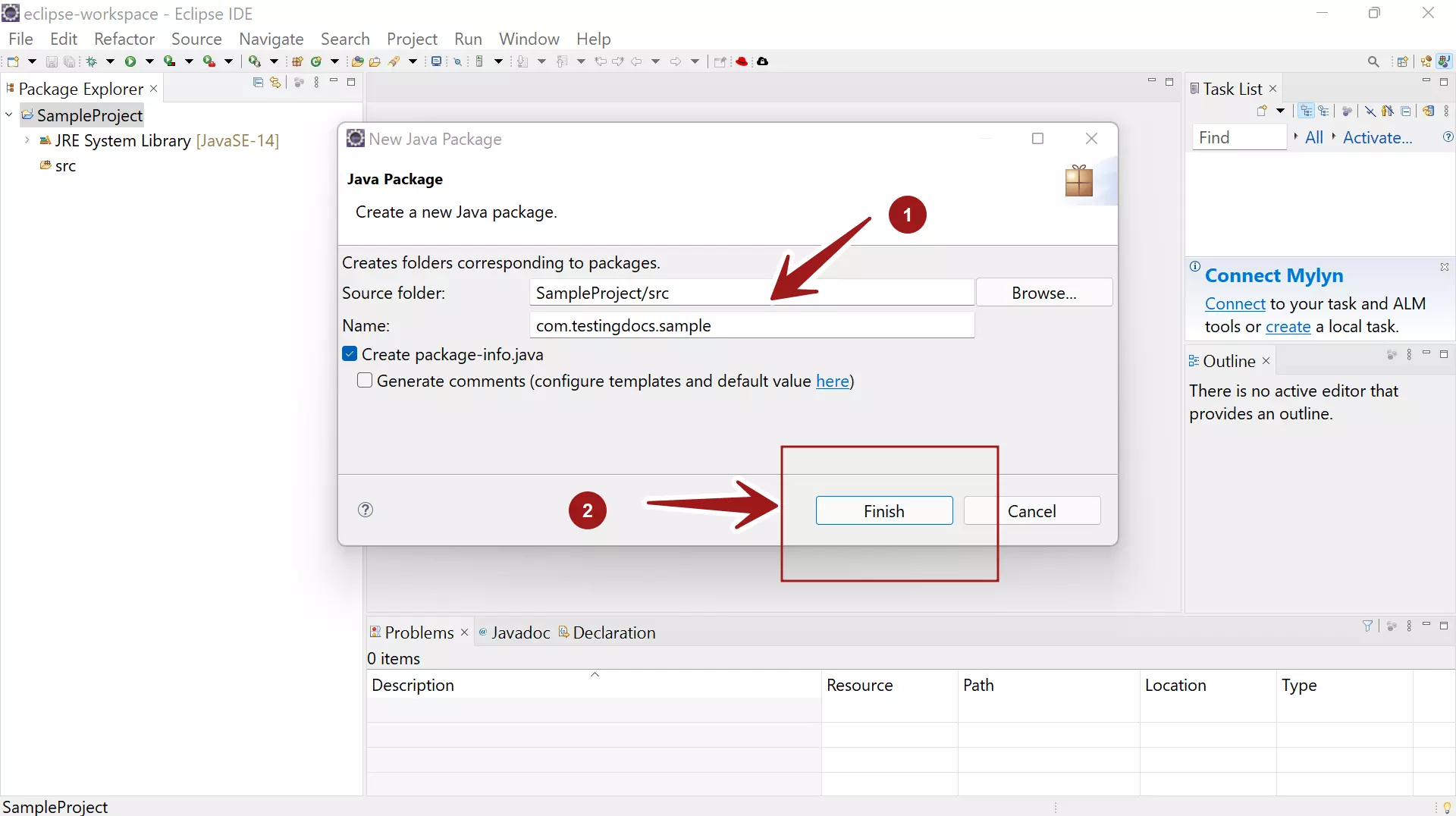
We can also create a package-info.java. On the Create new Java Package window, check the box option Create package-info.java.
A package-info.java file is a home for package-level documentation. It is a way to apply Java annotations at the Java package level.
Package names are defined in all lowercase to avoid conflict with the names of classes or interfaces.
Organizations use reversed Internet domain names to define the package names for their Java projects. For example, com.testingdocs.sample for a package named sample.
A class named HelloWorld is defined in the com.testingdocs.sample package. The fully qualified name of the class would be com.testingdocs.sample.HelloWorld
That’s it. We have created a new Java package inside a Java project using Eclipse IDE. You can create related classes, interfaces, etc in packages.
To create a New Java Class:Â New Java Class in Eclipse IDE
Eclipse Tutorials
Eclipse Tutorials on this website can be found at:
For more details on the Eclipse IDE, visit the official website