
Blog
MantisBT Rest API Guide

MantisBT Rest API Guide
In this tutorial, we will learn how to enable the Mantis API token and execute a sample MantisBT Rest API call. Rest API is enabled by default on the Mantis instance. However, we need to enable the API token for authorization. This token is specific to the user and can be enabled on the My Account page.
Create API Mantis Token
Steps to create an API token
API Test Tool
This tutorial uses the Postman API tool. To know more about the tool please follow the link:
Server-side Resources
Mantis Rest Web services operate on the MantisBT Server-side resources without any user interface. Some of the resources are:
- Projects/ Sub-Projects
- Issues / Attachments
- Versions
- Filters
MantisBT Rest API
Mantis Bug Tracker API calls have to be authenticated by creating an API token for the user executing the calls. We need to pass the API token in the Authorization HTTP header. Authorization and the token form a KV(Key-value pair). The absence of this token or passing an invalid token would result in 401 or 403 errors.
Specify the Authorization header.
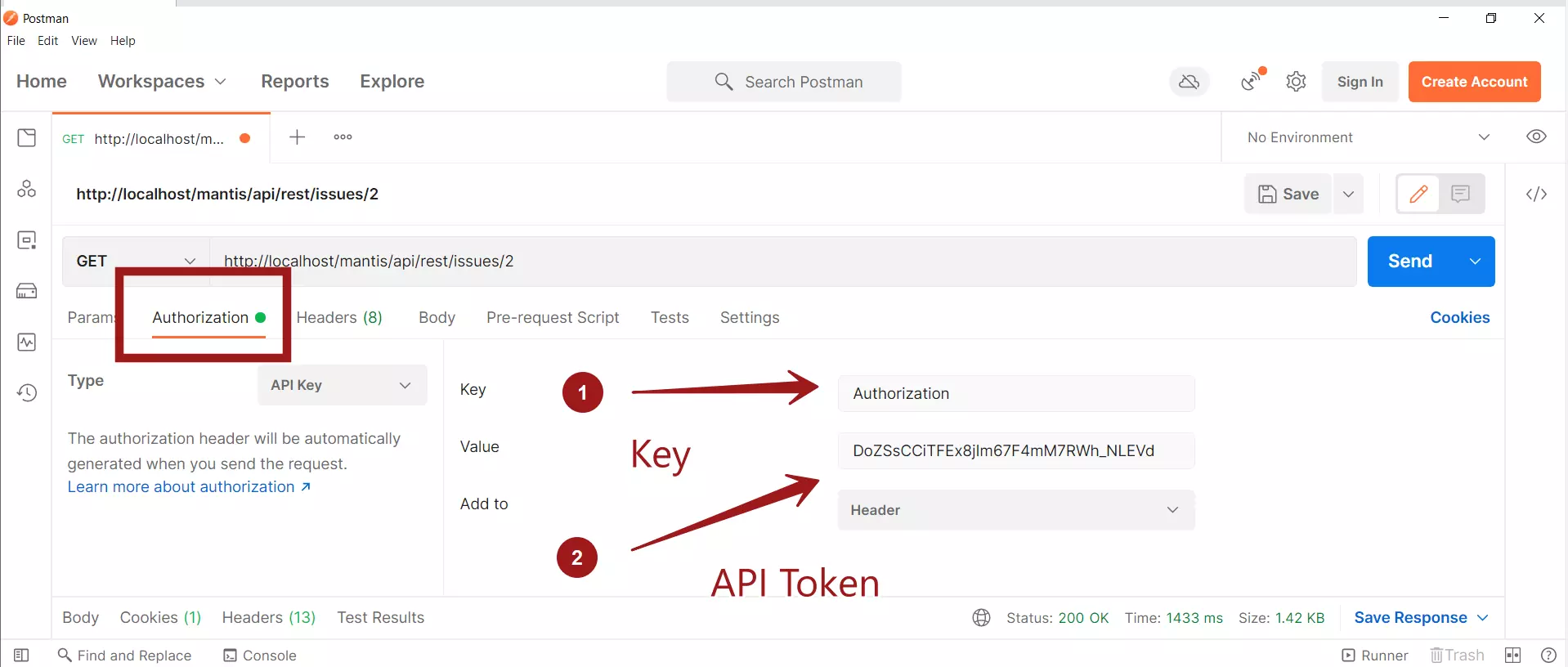
API Request
Specify the API URL Endpoint.
To retrieve an issue, use the GET /issues/<issue_id> API call.
For example, to retrieve the details of the issue id 2
http://localhost/mantis/api/rest/issues/2
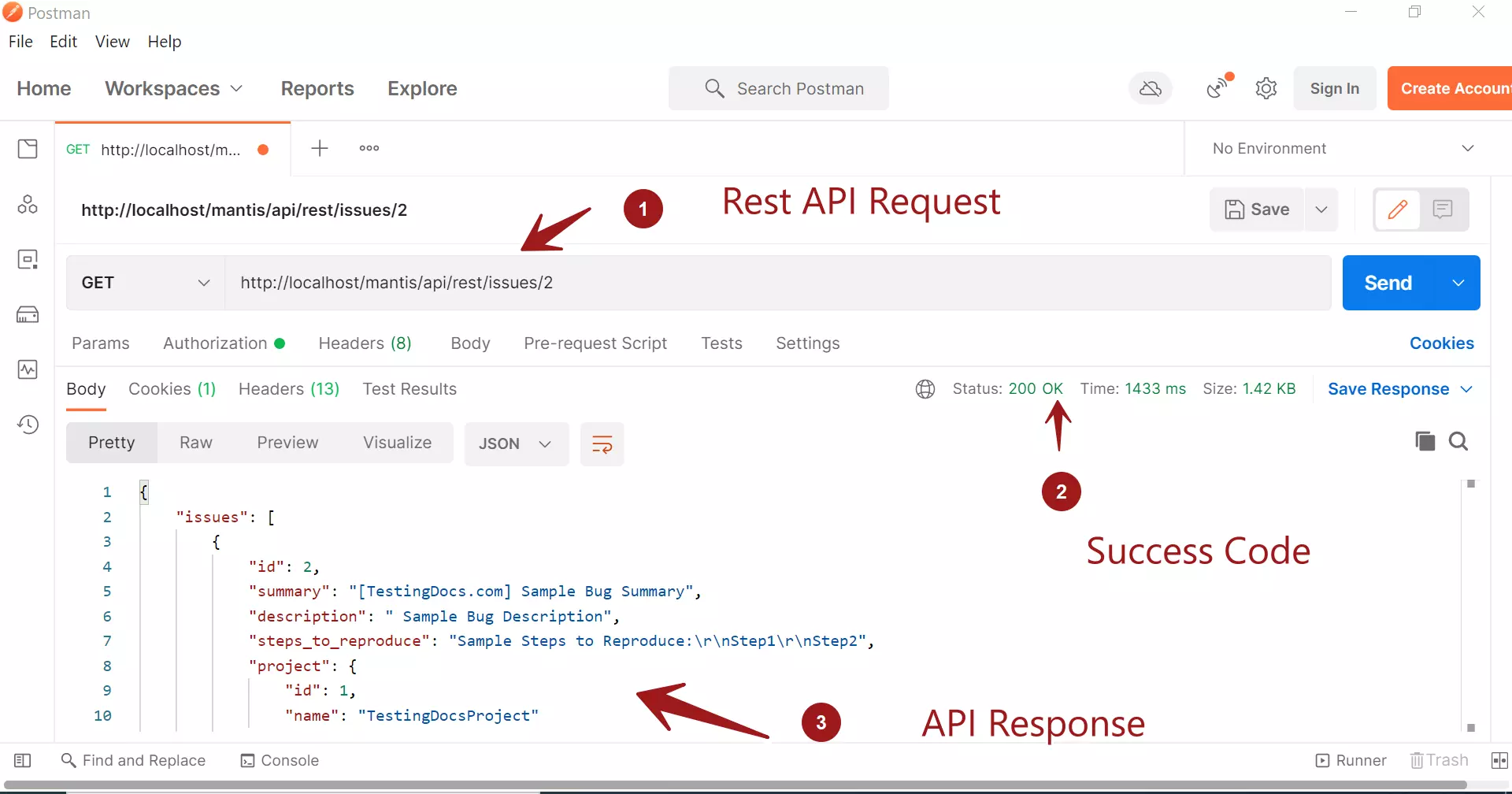
API Response
Sample response for the above API request in JSON format:
{
    "issues": [
        {
            "id": 2,
            "summary": "[TestingDocs.com] Sample Bug Summary",
            "description": " Sample Bug Description",
            "steps_to_reproduce": "Sample Steps to Reproduce:\r\nStep1\r\nStep2",
            "project": {
                "id": 1,
                "name": "TestingDocsProject"
            },
            "category": {
                "id": 1,
                "name": "General"
            },
            "reporter": {
                "id": 1,
                "name": "administrator",
                "email": "root@localhost"
            },
            "status": {
                "id": 10,
                "name": "new",
                "label": "new",
                "color": "#fcbdbd"
            },
            "resolution": {
                "id": 10,
                "name": "open",
                "label": "open"
            },
            "view_state": {
                "id": 10,
                "name": "public",
                "label": "public"
            },
            "priority": {
                "id": 40,
                "name": "high",
                "label": "high"
            },
            "severity": {
                "id": 60,
                "name": "major",
                "label": "major"
            },
            "reproducibility": {
                "id": 70,
                "name": "have not tried",
                "label": "have not tried"
            },
            "sticky": false,
            "created_at": "2019-08-10T04:39:57+00:00",
            "updated_at": "2019-08-10T04:39:57+00:00",
            "history": [
                {
                    "created_at": "2019-08-10T04:39:57+00:00",
                    "user": {
                        "id": 1,
                        "name": "administrator",
                        "email": "root@localhost"
                    },
                    "type": {
                        "id": 1,
                        "name": "issue-new"
                    },
                    "message": "New Issue"
                }
            ]
        }
    ]
}
Create Issue Rest API call
https://www.testingdocs.com/create-issue-using-mantis-rest-api/
Related
TestLink Test Management Tool Rest API Guide
Rest API Automation
—