
Blog
Docker Container Life Cycle

Docker Container Life Cycle
Docker is a platform that allows developers to build, ship, and run software applications inside lightweight, portable containers. These containers package an application along with all its dependencies, ensuring consistency across different environments. Just like physical or virtual machines, Docker containers have a lifecycle â a series of stages they go through from creation to deletion. Understanding this lifecycle helps in managing containers more efficiently.
Container Life Cycle
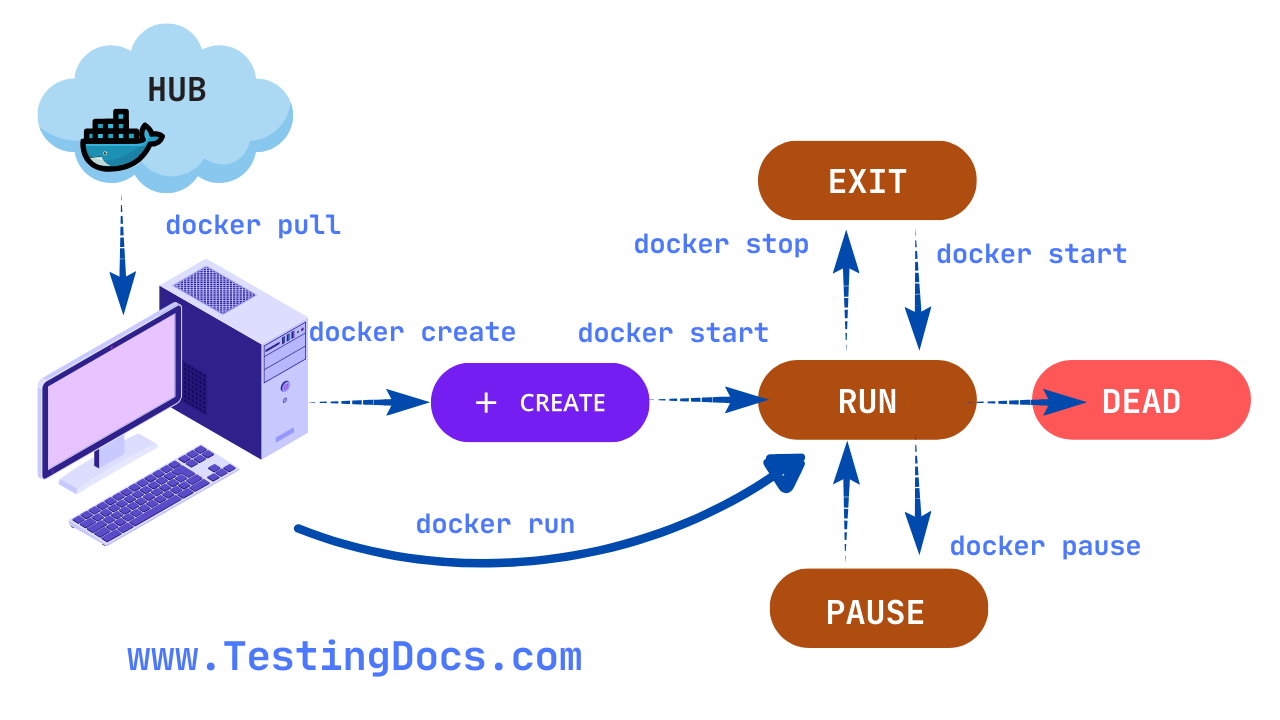
The Docker container life cycle includes various stages that define the state of a container during its existence. These stages help developers understand and control what happens at each point in the container’s operation.
Created
In this stage, a container is created using a Docker image but is not yet running. This is like preparing a vehicle before turning on the engine. The container exists, but its process has not started.
Running
Once the container is started, it enters the running state. The application or process inside the container is actively executing. This is the main operational phase where the container does its intended work.
The docker run command is one of the most commonly used Docker commands. It is used to create and start a new container from a Docker image.
Paused
A running container can be paused, which temporarily halts all processes inside the container. This is useful for saving resources without completely stopping the container. Once paused, the container can be resumed.
Stopped
When the main process inside a container ends or the container is explicitly stopped, it enters the stopped state. The container exists on the system, but it is not active or consuming CPU resources.
Exited
This state is similar to stopped, but specifically means that the container has terminated on its own after completing its task or encountering an error. The exit code can be used to diagnose what happened.
Dead
A rare state that indicates a container failed to shut down cleanly and is in an unresponsive state. This usually requires manual intervention to remove or force-delete the container.
Removed
When a container is deleted from the Docker host, it is said to be removed. All its data and settings are lost unless volumes or backups were used. This is the final stage in the container’s life cycle.