
Blog
Read Excel File using Apache POI

Read Excel File using Apache POI
In this post, we will write a simple Java program to read an excel file using Apache POI.
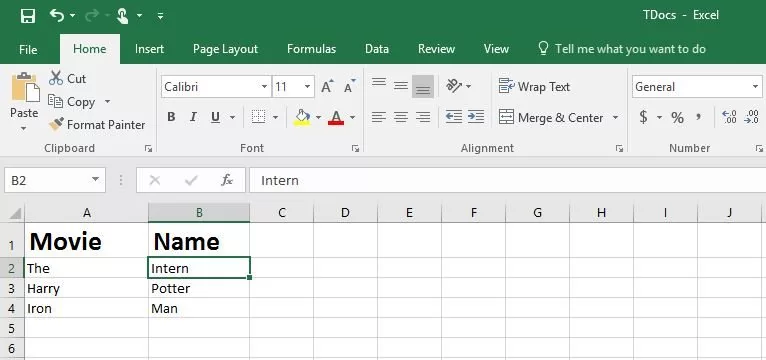
First of all, let us create a simple excel file with data to read. Let’s use a sample Excel sheet with movie names with 2 columns. We will read the data from the Excel file in this tutorial. The filename of the Excel file is TDocs.xlsx.
Program to Read an Excel Row
The simple method to get one single row is shown below:
public ArrayList<String> getMyRow(int rowIndex, int endColIndex,int sheetIndex) throws IOException{
 ArrayList<String> rsData = new ArrayList<String>();
 try {
 file = new File("TDocs.xlsx");
 fis = new FileInputStream(file);
workbook = new XSSFWorkbook(fis);
 sheet = workbook.getSheetAt(sheetIndex);
 for(int colStartPosition=0; colStartPosition<=endColIndex; colStartPosition++){
 Cell cell = sheet.getRow(rowIndex).getCell(colStartPosition);

 switch(cell.getCellType()) {
 case Cell.CELL_TYPE_STRING:
 rsData.add(cell.getStringCellValue());
 break;
 }
 }

 }catch (Exception e) {
 e.printStackTrace();
 }
 finally{
 fis.close();
 }
return rsData;
 }
Now, consume this method to read the data by passing the row index, columns in the main method.
public static void main(String... args) throws IOException
 {
 ArrayList<String> consume = new ArrayList<String>();
 ReadXL readexcel = new ReadXL();
 consume = readexcel.getMyRow(1, 1, 0);
 System.out.println("**********OutPut************");
for(String s : consume)
 {
 System.out.print(s);
}

 }
Run output of the program is displayed below :
**********OutPut************
TheIntern

That’s it. We have successfully read data from an existing Excel file. This is useful in Selenium Automation for reading test data from an excel file.